 REMIT Relax
REMIT Relax - The Reporting Medkit
Your Safety Net for REMIT Reporting
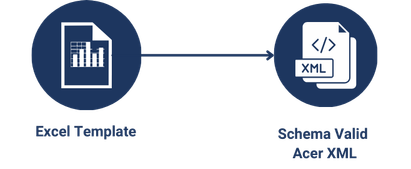
When exceptional or emergency reporting situations hit, REMIT Relax has you covered. Turn Excel sheets—or data entered directly online—into fully schema-validated ACER XML files within minutes, with no technical integration required.
Create Your Free Account NowAbout REMIT Relax
Convert Excel Sheets into ACER XML Files
REMIT Relax (Ponton R/R) is a streamlined solution developed by Ponton for handling REMIT reporting, particularly in exceptional and emergency regulatory scenarios. It enables users to quickly report existing trade data without complex setup—simply copy and paste your data into predefined Excel templates and upload the file to REMIT Relax. The system then converts the uploaded data into ACER-compliant, schema-validated XML files, ensuring full regulatory compliance with minimal effort.
Want to learn more about REMIT reporting and ACER XML? See our FAQ page for detailed information.
Generate ACER XML Files in Minutes
For Whom is REMIT Relax?
Small and Medium Companies
Ideal for companies with a low volume of reports where a full system integration would not be cost-effective or would require too much effort.
Complex or Rare Products
For companies with portfolio segments that occur infrequently or are too complex to be handled through automated integration.
Emergency Backup Solution
A reliable backup when your main reporting solution encounters technical issues or downtime.
Features
No Integration Required
The newest version of REMIT Relax is a cloud-based solution. No software installation or system integration needed. Just upload your prefilled Excel-Template file or create your report online, and get your ACER XML file in seconds. Perfect for exceptional reporting situations or when you need a quick solution without IT involvement.
Learn how to process an Excel file
Online Editor
Create new reports directly online—no Excel upload required. Ideal for copying existing reports or exploring format structures. After processing, all files can also be downloaded as Excel sheets.
Learn how to use the online editor
Supporting ACER Standards
REMIT Relax supports most common ACER reports to keep you compliant:
- • Standard Trades (Table 1)
- • Non-Standard Reporting (Table 2)
- • Execution Reporting
- • Secondary Gas Capacity (Table 4)
- • Fundamental LNG
- • Gas Storage Reporting
- • UTI Generation (ACER Algorithm)
Schema Validation
Automatically validates your data against ACER's schema, ensuring that your reports meet all regulatory requirements and are accepted without errors.
UTI Generation
Generates Unique Trade Identifiers (UTIs) using the latest ACER UTI Algorithm, ensuring full compliance and traceability for all your trade reports. UTIs can be written directly back into your Excel file, and the UTI base string is also displayed on the history page for easy traceability.
More infos about UTI Generation
User-Friendly Interface
Intuitive design makes creating ACER XMLs easy. The History Page provides an overview of recent reports—download them or copy them to generate new ones.
Be Ready for REMIT II
REMIT II Goes Live in 2027
No need to panic. REMIT Relax will help you handle edge cases with ease and ensures you are fully compliant well before the deadline.
More about REMIT II: FAQ - What is REMIT II?
Pricing
Free Subscription
Perfect for testing
- Limited features
- Create small number of REMIT Table 1 trades
- Test the application without cost
- Get a feeling of how it works
Full Subscription
Monthly Base Fee
Additional Transaction Fees:
Example Calculation:
2,640 transactions per year (220/month avg.) = Base €1,200 + Additional €264 = €1,464 total annual fee
Custom Subscription
Tailored to your needs
If you need custom pricing or higher volumes, we are happy to talk.
Frequently Asked Questions
What is REMIT?
REMIT is the EU regulation that enhances transparency and prevents insider trading and market manipulation in wholesale energy markets, enforced by ACER.
Read the full answerWho needs to report under REMIT?
In general, all market participants active in the European wholesale energy market are subject to reporting obligations under REMIT.
Read the full answerIn which format do I need to report to ACER?
Standard contracts are reported as REMIT Table 1 ACER XML, and non-standard contracts as REMIT Table 2 ACER XML, per the ACER Transaction Reporting User Manual (TRUM).
Read the full answerHow can the REMIT Relax Excel Converter support me?
Just upload your prefilled Excel template or work online, and REMIT Relax generates a fully schema-valid ACER XML file—no macros, no technical integration.
Read the full answerRead the Docs
Our documentation gives you a good introduction to REMIT Relax—from getting started and processing your first Excel file, to using the online editor and generating your ACER XML report.
Go to the Documentation